Introduction
USB cables may look similar on the outside, but their internal construction and capabilities can vary considerably. Some are designed primarily for charging smartphones and small accessories, while others support high-speed data transfer, laptop charging, or demanding USB Power Delivery applications. Choosing the right cable is therefore not always as simple as checking whether both connectors fit.
This is particularly important with USB-C cables. The USB-C connector describes the physical connection, but it does not automatically tell you how much power a cable can support, which data-transfer speeds it handles, or whether it contains the electronic components needed for certain power-delivery configurations. These differences can matter when connecting laptops, docking stations, monitors, chargers, power banks, and other USB-C equipment.
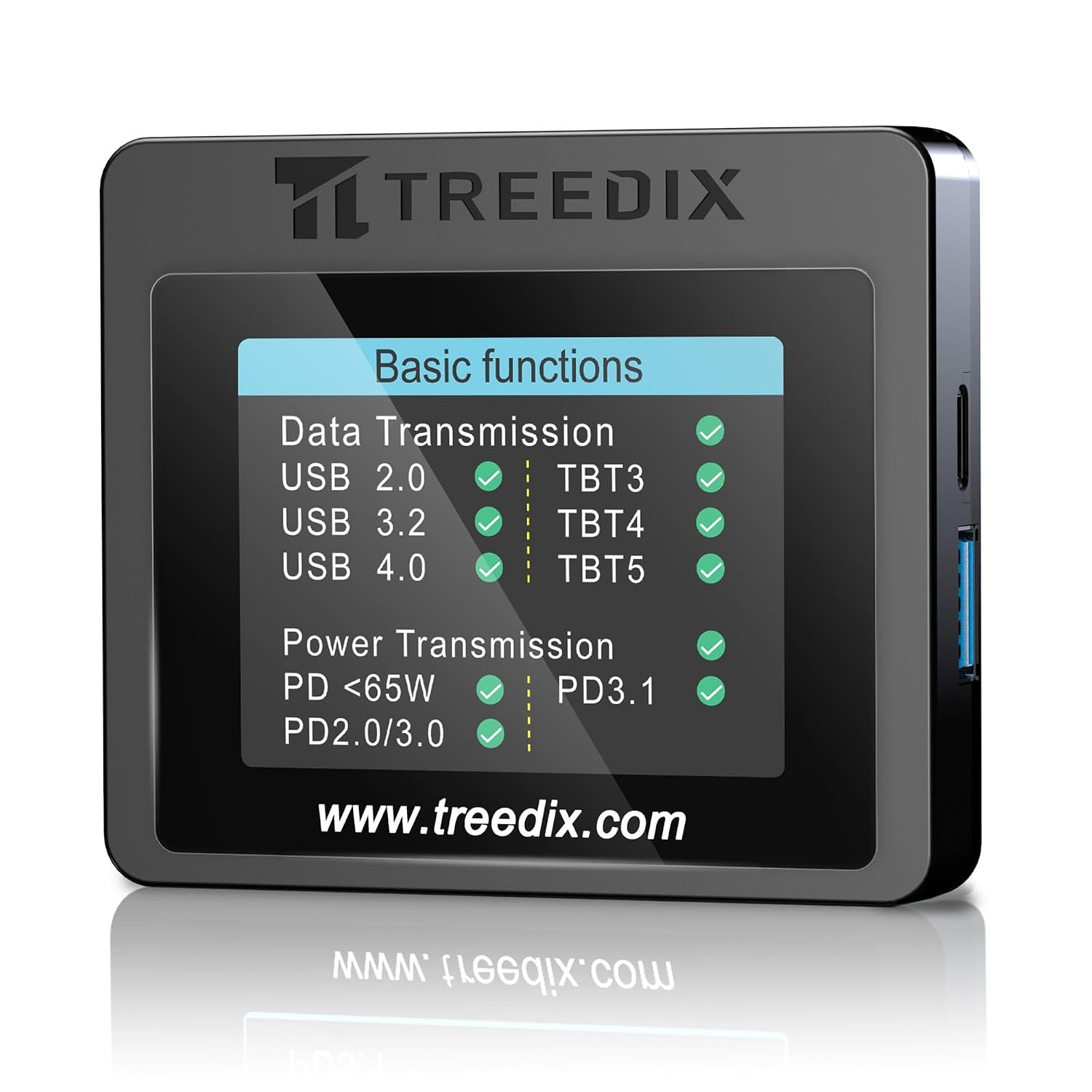
The Treedix USB Cable Tester with a 2.4-inch screen is designed for people who want to examine cable characteristics more closely. Its advertised functions include testing related to eMarker information, Power Delivery standards, and resistor identification. These capabilities can help users investigate how compatible cables are configured and better understand their intended applications.
An important part of this process is understanding what a cable tester can establish and what still requires separate equipment. Reading an electronic identifier is different from measuring actual charging performance, verifying data-transfer speed, or determining whether a cable meets every applicable safety requirement.
This guide explains the purpose of the Treedix USB Cable Tester, the technology behind USB-C eMarker chips, the role of resistors in USB-C connections, and practical situations in which a cable tester may be useful. It also discusses limitations, general tester categories, and questions worth considering before choosing a testing tool.
Understanding the Treedix USB Cable Tester
The Treedix USB Cable Tester is an electronic diagnostic tool intended to provide information about compatible USB cables. Its advertised 2.4-inch screen gives users a way to view test information without relying entirely on a computer application or a separate diagnostic display.
The product’s stated focus on eMarker detection, USB Power Delivery 3.0 and 3.1, and resistor-related information places it within a specialized category of USB-C testing equipment.
To understand why these functions matter, it helps to distinguish three related but separate concepts:
- Cable identification: Reading information that an electronically marked cable communicates to compatible equipment.
- USB-C configuration: Examining electrical signaling and resistor arrangements used to identify connection roles and capabilities.
- Performance testing: Measuring what a cable actually delivers under specified operating conditions, including voltage, current, data throughput, and signal quality.
A diagnostic device may provide useful information about the first two areas without performing every test associated with the third. The exact measurements, supported connector arrangements, and available test modes should be confirmed in the current product documentation.
What Is an eMarker Chip?
An eMarker, or electronically marked cable identification chip, is an electronic component incorporated into certain USB-C cables. It communicates information about the cable to compatible equipment through the USB-C configuration channel.
Depending on the cable and its implementation, this information can include supported current capability, voltage-related characteristics, connector information, and data-related capabilities.
Not every USB-C cable contains an eMarker. Many ordinary cables designed for lower-power applications do not require one. Electronically marked cables become particularly relevant when higher current capacity or more advanced cable capabilities must be communicated to the connected equipment.
For example, a USB-C cable intended to support 5-amp operation generally requires appropriate electronic marking. The device on the other end can use the cable’s reported capabilities when determining which operating configurations are appropriate.
An eMarker is not, however, a universal quality certificate. Its presence does not independently prove that every component in the cable is well manufactured, that the cable will achieve a particular data-transfer speed in every setup, or that it will operate reliably under every condition.
A tester that can read eMarker information helps users inspect what a compatible cable reports about itself. This is useful when documenting cables, comparing their declared capabilities, or investigating unexpected behavior.
What USB Power Delivery Means
USB Power Delivery, commonly abbreviated as USB PD, is a power-negotiation protocol used by compatible USB devices. It allows a power source and a connected device to negotiate an appropriate power configuration instead of relying exclusively on a fixed, low-voltage supply.
A compatible charger, cable, and receiving device work together to establish an available operating mode. The result depends on the capabilities and limitations of the entire connection.
USB PD 3.0 and USB PD 3.1 are generations of this protocol. USB PD 3.1 introduced Extended Power Range configurations that can support higher voltage levels than earlier Standard Power Range configurations, subject to the requirements of the equipment and cable involved.
A cable marked for a particular power capability does not force a charger to deliver that amount of power. The source and receiving device must also support the appropriate configuration, and the connection must satisfy the protocol’s requirements.
For this reason, a cable tester that displays relevant eMarker or PD-related information can provide useful diagnostic context. It should not automatically be treated as proof that a complete charging system will reach its maximum advertised wattage.
Why Resistor Detection Matters
USB-C connections use configuration-channel signaling to help devices identify connection arrangements and establish appropriate behavior. Resistor values and configurations play a role in this process.
For example, the USB-C configuration channel uses pull-up and pull-down arrangements associated with connection roles and current advertisement. These electrical characteristics help compatible equipment determine how a connection should be established.
Resistor-related testing can be useful when investigating whether a cable or adapter presents an expected configuration. It may also help explain why certain connections behave differently when using different cables or accessories.
However, resistor information should be interpreted in the context of the specific cable, adapter, and test method. A single resistor-related reading cannot establish every aspect of USB-C compatibility, nor does it replace complete protocol-compliance testing.
Key Features of the Treedix USB Cable Tester
The following sections explain the significance of the functions associated with this tester. They describe the general purpose of these capabilities rather than assuming that every possible measurement or diagnostic mode is included.
1. A 2.4-Inch Display for Reading Test Information
A dedicated display can make a diagnostic tool easier to use when checking cables at a workbench or during troubleshooting.
Instead of depending exclusively on a computer, users can potentially view supported identification or measurement information directly on the tester. A screen is especially helpful when comparing several cables, recording their reported characteristics, or checking a connection without opening additional software.
The practical value depends on how the device organizes its results. Clear labels, understandable units, and readable values are more important than screen size alone.
Before relying on a particular measurement, users should consult the manual to determine what the displayed value represents, which test mode produced it, and whether the reading describes an advertised capability or an actual electrical measurement.
2. eMarker Information Detection
The tester is advertised for eMarker-related detection. This is relevant because electronically marked cables may communicate information that cannot be established simply by examining their exterior.
A cable’s connector shape, printed branding, and general thickness do not reliably reveal every supported operating mode. Electronic identification can offer another source of information.
For a technician or electronics enthusiast, this can help answer questions such as whether a compatible cable reports an electronically marked configuration and which capabilities are declared through its identification data.
The result should be understood as information reported by the cable, not an independent guarantee of manufacturing quality. If a cable reports unexpected information, further investigation may be needed before deciding whether it is suitable for a demanding application.
3. Relevance to USB PD 3.0 and PD 3.1
The product’s advertised association with USB PD 3.0 and 3.1 is relevant to modern charging setups, including USB-C chargers, compatible laptops, power banks, and other devices.
These standards help define how compatible equipment negotiates power. The cable is one component in that system, and its capabilities can influence which operating modes are available.
Testing tools that expose relevant cable identification or negotiation information can help users understand why two apparently similar cables may behave differently.
It is important to distinguish support for identifying a cable associated with a PD standard from complete testing of that standard. Full protocol validation may require more advanced equipment, and the exact test coverage of the Treedix unit should be checked in its current documentation.
4. Resistor-Related Testing
Resistor detection can help investigate USB-C configuration behavior. This may be useful when working with cables, adapters, or small electronics projects where the expected electrical arrangement matters.
For instance, a technician might need to investigate why a device does not recognize a connection as expected. Checking configuration-related information can be one step in identifying the cause.
Such a test is only one part of the diagnostic process. A cable can present an expected configuration and still have a damaged conductor, poor connector contact, or a problem affecting high-speed data signals.
5. A Specialized Tool for Cable Investigation
A dedicated cable tester fills a different role from an ordinary charging cable or USB power adapter. Its purpose is to reveal diagnostic information rather than simply connect two devices.
For people who regularly handle USB-C accessories, a specialized tester can make cable identification and troubleshooting more systematic. It can also help reduce dependence on visual assumptions, such as believing that all cables with USB-C connectors have equivalent capabilities.
The tester’s usefulness ultimately depends on the exact interfaces it supports, its power requirements, the clarity of its results, and the range of cable characteristics it can evaluate.
How the Treedix USB Cable Tester Can Be Used
A cable tester becomes most useful when its readings are connected to a clear diagnostic question. The following scenarios illustrate practical applications for USB-C cable testing.
Checking an Unfamiliar USB-C Cable
Many people accumulate USB-C cables from phones, tablets, computers, chargers, and accessories. Over time, the original packaging and labels may disappear, making it difficult to remember which cable was intended for which application.
A tester that can read supported identification information may help distinguish cables with different declared capabilities.
A sensible process is to connect the cable according to the manufacturer’s instructions, select the appropriate test mode, and record the information the device reports. Users can then label the cable for future reference if the results are clear and relevant.
It is still necessary to verify the cable’s physical condition and confirm that its declared capabilities match the requirements of the intended device.
Investigating Laptop Charging Problems
A laptop may charge slowly, display a charging warning, or fail to charge through a particular USB-C connection. Several factors can cause these symptoms, including the charger’s output capability, the laptop’s power requirements, cable limitations, connector damage, and USB PD negotiation problems.
A cable tester can help investigate the cable-related portion of the problem if it supports the relevant tests.
For example, checking reported cable identification may help establish whether the cable declares a capability appropriate for a particular high-current setup. However, this does not prove that the charger, laptop, or cable can sustain a specific power level in real-world operation.
A practical troubleshooting sequence is to verify the charger’s specifications, inspect the connectors, consult the laptop manufacturer’s requirements, and compare the results with a known-compatible cable. If the problem persists, additional electrical measurements or professional diagnosis may be appropriate.
Comparing Cables Intended for High-Power Charging
USB-C cables are used in charging arrangements with different power requirements. A cable intended for a small accessory may not be suitable for every laptop or high-power application.
When comparing cables, users should consider the manufacturer’s stated current and power ratings, the supported USB PD configurations, and whether electronic marking is required for the intended use.
A compatible tester may help read relevant identification data. The results can then be compared with the cable’s documentation.
This process is more informative than relying on appearance alone, but it does not remove the need to verify the charger and receiving device. The maximum usable power is determined by the capabilities of the complete system rather than the cable in isolation.
Organizing a Technical Workspace
Repair shops, computer labs, electronics hobbyists, and IT departments may keep many cables for testing and maintenance. Mixing cables with different capabilities can create confusion, particularly when a cable is moved between devices.
A cable tester can support a more organized inventory process. Staff can record available identification information, note the cable’s intended use, and mark cables that should be investigated further.
A basic record might include the cable’s label, connector type, declared power capability, declared data capability when available, test date, and physical condition.
These records should clearly separate information read from the cable from information independently verified through performance testing. That distinction becomes important when several people rely on the same cable inventory.
Troubleshooting Adapters and Accessory Combinations
USB-C systems often include adapters, hubs, docks, extension arrangements, and other accessories. Every additional component can affect compatibility.
A tester may help investigate a cable in isolation, but a successful cable test does not establish that an entire chain of accessories is compatible. An adapter might impose a limitation, a hub may require a particular power arrangement, or a connected device may support fewer features than the cable.
Testing individual components separately, where the tester supports the relevant configuration, can make it easier to narrow down a problem.
Users should avoid assuming that every adapter or cable combination can be tested using the same method. Follow the product’s supported connection arrangements and never force incompatible connectors together.
Learning About USB-C Technology
USB-C is widely used, but its electrical and protocol behavior can be unfamiliar to people who are comfortable with ordinary charging accessories.
A cable tester can provide a practical introduction to concepts such as electronic cable identification, configuration-channel signaling, and power negotiation.
Students and hobbyists can use test results as a starting point for further learning. Comparing documented cable specifications with reported identification data may help illustrate why connector shape alone does not define capability.
For educational work, however, a cable tester should be treated as one instrument among several. It does not replace technical documentation, protocol analyzers, electrical measurement tools, or appropriate safety procedures.
Who May Find This Type of Tester Useful?
The Treedix USB Cable Tester may be relevant to several groups, depending on the supported test modes and their particular needs.
Electronics Hobbyists
People who build circuits, experiment with USB-C power supplies, or repair electronic accessories may find cable identification useful.
Understanding configuration-related information can help them investigate connections and learn more about how USB-C equipment communicates. Users working with custom circuits should also consult the relevant specifications and use suitable electrical protection.
Computer and IT Technicians
IT professionals often handle USB-C charging cables, laptop accessories, docking stations, and replacement components.
A specialized tester may help with initial cable identification and troubleshooting. It can also support consistent cable labeling across a workspace.
For professional deployment, the tester’s supported cable types and diagnostic limits should be assessed before making it part of a formal repair or quality-control process.
Repair Shops and Electronics Workbenches
A repair environment may involve cables with different connectors, power capabilities, and data functions. A tester can provide another diagnostic step when a charging or connection problem appears to involve the cable.
It is most useful when combined with a repeatable procedure that includes visual inspection, known-compatible reference equipment, and additional testing when necessary.
Technology Enthusiasts
People who own several USB-C devices may want to understand the differences between their cables instead of keeping them in one undifferentiated collection.
A cable tester can be useful for exploring these differences, provided its results are interpreted correctly. For someone who only occasionally charges a phone, however, a specialized diagnostic device may offer limited practical value compared with checking manufacturer specifications and using compatible accessories.
Students and Technical Learners
Students studying electronics, computer hardware, or USB-related systems may benefit from observing cable identification information directly.
The tool can help connect theoretical concepts with practical examples, although its instructional value depends on the quality of its documentation and the test information it exposes.
Important Things to Consider Before Using a USB Cable Tester
A tester’s usefulness depends on more than its display or the standards mentioned in its product title. Several technical details deserve attention before choosing a device or interpreting its readings.
1. Identification Is Not the Same as Performance Testing
One of the most important distinctions is between reading what a cable reports and measuring what it actually does.
An eMarker can communicate declared capabilities. That information can help compatible equipment determine suitable operating configurations, but it does not independently establish that every conductor, connector, or internal component performs correctly.
A cable may report the expected information while still suffering from physical damage or a manufacturing defect.
Similarly, a cable that successfully supports basic charging may not necessarily support the data rates or signal quality required by another application.
If a task requires verified current handling, voltage drop, data throughput, signal integrity, or compliance with a formal standard, confirm that the tester performs the specific test and that its method is suitable for the intended purpose.
2. Verify Supported Connectors and Cable Types
USB-C testing is not identical to testing every USB cable format. Products may differ in the connectors they accept, the adapters they require, and the cable configurations they can evaluate.
Before using the Treedix unit, check the current instructions for supported connections, orientation requirements, and any restrictions on cable or adapter arrangements.
Do not assume that a tester can evaluate every USB-A, USB-C, Micro-USB, Lightning, or proprietary cable merely because it is described as a USB cable tester.
If an adapter is required, confirm that the adapter is intended for the test and does not alter the result in an unexpected way.
3. Understand USB PD Power Limits
USB PD 3.1 includes operating modes designed for higher power levels than earlier USB PD generations. However, the presence of PD 3.1 in a cable’s description does not mean every connection will operate at the highest possible power.
The charger must offer a compatible power profile, the receiving device must request and support an appropriate mode, and the cable must be suitable for the configuration.
Power depends on the negotiated voltage and current, subject to applicable protocol and equipment limits. For this reason, cable identification alone should not be used as the sole basis for estimating actual charging speed.
When troubleshooting a power issue, check the charger’s output profiles, the device’s input requirements, the cable’s specifications, and any relevant manufacturer guidance.
4. Data Speed Requires Separate Attention
USB-C is a connector type, not a guarantee of one particular data-transfer rate.
Cables can differ in supported USB data standards, wiring, shielding, and signal-integrity characteristics. Some cables are intended mainly for charging, while others support high-speed data or additional functions such as video transmission when used with compatible equipment.
A tester’s ability to identify cable characteristics should not be confused with a full test of actual data throughput or signal quality.
If a cable is intended for an external SSD, high-resolution display, docking station, or other bandwidth-sensitive application, verify the specific data and display requirements separately.
5. Physical Condition Still Matters
Even a cable with appropriate identification information may be unsuitable if its connectors are loose, its insulation is damaged, or its conductors have been compromised.
Inspect cables before testing and discontinue use if they show exposed wires, melted areas, unusual heat, or other signs of damage.
Do not use a tester to justify continued use of a visibly unsafe cable. Diagnostic readings are only one part of evaluating an accessory’s condition.
6. Check the Device’s Own Operating Requirements
Before connecting the tester, read its instructions to determine how it is powered, which connections should be made first, and whether a cable or external supply is required for a particular mode.
Avoid connecting unknown power sources or making experimental arrangements that exceed the stated operating limits.
A cable tester should be used according to its intended procedure rather than treated as a general-purpose device for probing any USB connection.
7. Do Not Assume Certification From a Displayed Result
A tester may reveal useful cable information, but that does not automatically certify a cable or establish formal compliance with every USB specification.
Certification and compliance assessment can involve defined test procedures, approved equipment, and specific requirements beyond identification data.
For professional or regulated applications, consult the relevant standards and use appropriately qualified testing equipment.
8. Consider Documentation and Ease of Interpretation
A diagnostic tool is easier to use correctly when its manual explains the meaning of displayed values and identifies the limitations of each test mode.
Look for clear instructions about supported cable types, the interpretation of eMarker data, resistor-related readings, power requirements, and any warnings about incompatible connections.
If a displayed result is ambiguous, avoid drawing a strong conclusion until the meaning has been verified through the documentation or additional testing.
Comparing General Categories of USB Cable Testing Tools
USB cable testing tools serve different purposes. Understanding these categories helps determine whether a specialized tester is appropriate for a particular task.
Basic Continuity Testers
Basic continuity testers focus on whether selected electrical paths are connected as expected. Depending on their design, they may identify open circuits, certain wiring errors, or connector-pin continuity problems.
They can be useful for simple cable checks, especially when investigating a suspected broken conductor.
However, a basic continuity test does not establish USB-C eMarker information, full power-delivery compatibility, high-speed signal integrity, or actual charging performance.
USB-C Identification Testers
Identification-focused testers examine selected USB-C characteristics, which may include eMarker data or configuration-related information.
These tools are useful when the primary question concerns what a cable reports about its supported capabilities.
Their coverage varies considerably. One model may focus on a narrow set of identification fields, while another may expose more detailed information. The supported functions should be checked individually rather than inferred from the general product category.
USB Power Meters and Power Monitors
USB power meters measure electrical characteristics such as voltage and current while a connection is operating. Some models also display power, accumulated energy, or information about supported charging protocols.
These measurements can help investigate how much power is being delivered under a particular set of conditions.
A power meter is not automatically an eMarker reader or a comprehensive USB-C cable tester. Its readings also depend on where it is inserted into the connection and whether the device is compatible with the operating mode being tested.
Advanced Protocol and Compliance Analyzers
More advanced analyzers are designed to investigate protocol communication, signal behavior, or standards compliance. Their capabilities vary, but they may be used for engineering development, troubleshooting complex interoperability problems, and formal testing.
Such equipment can be more complex than necessary for ordinary cable identification.
A specialized USB cable tester may be a more practical starting point when the objective is limited to supported identification and configuration checks. When a task demands complete compliance verification, an appropriate analyzer and a defined test procedure may be necessary.
Choosing the Right Category
The most suitable tool depends on the question being asked.
If the main concern is whether a conductor is broken, continuity testing may be sufficient. If the goal is to read supported eMarker information, an identification tester is more relevant. If the goal is to measure real operating voltage and current, a power meter may be appropriate. If the task requires detailed protocol analysis, more advanced equipment may be needed.
These categories can complement one another rather than compete directly. In a professional environment, using more than one type of instrument can provide a clearer understanding of a cable or connection.
Frequently Asked Questions
What does the Treedix USB Cable Tester test?
The product is advertised for USB cable testing involving a 2.4-inch display, eMarker detection, USB PD 3.0 and 3.1-related capabilities, and resistor information. The precise test modes, supported connections, and displayed fields should be confirmed in the current product documentation.
What is an eMarker in a USB-C cable?
An eMarker is an electronic identification component used in certain USB-C cables. It communicates supported cable information to compatible equipment. Depending on the implementation, that information may include current capability and other cable characteristics.
Do all USB-C cables have eMarker chips?
No. Not every USB-C cable requires an eMarker. Electronic marking is particularly relevant to certain higher-current cables and other cable configurations for which the specification requires or uses electronic identification.
Does an eMarker guarantee that a cable is safe?
No. An eMarker communicates identification information, but it does not independently guarantee overall build quality, physical condition, safety, or full standards compliance. Cable construction and actual performance also matter.
What is the difference between USB PD 3.0 and USB PD 3.1?
USB PD 3.1 extends the power-delivery specification with additional operating capabilities, including Extended Power Range modes. The power available in a real connection still depends on the charger, receiving device, cable, and negotiated configuration.
Can a cable tester tell me how fast my phone will charge?
Not necessarily. A tester may reveal relevant cable information, but actual charging speed depends on the phone, charger, cable, battery condition, temperature, and negotiated charging mode. Reading cable identification data alone does not establish the charging rate a phone will achieve.
Can the tester confirm that a USB-C cable supports high-speed data?
That depends on the specific identification and measurement functions available. Even if a tester can read data-related cable information, a full data-transfer or signal-integrity test is a separate matter. Confirm the supported functions before relying on the device for bandwidth-sensitive applications.
Is a USB cable tester useful for troubleshooting a laptop that will not charge?
It can be one part of the process if it supports the relevant cable checks. However, the charger, laptop, connector, and power-negotiation process may also be responsible. Compare the cable with a known-compatible alternative and consult the manufacturer’s power requirements before drawing a conclusion.
Can a cable pass a test and still be defective?
Yes. A cable may pass one type of test while having a problem that the test does not measure. For example, a continuity check does not establish high-speed signal quality, and an identification reading does not guarantee that the cable can sustain its declared operating conditions.
Is this type of tester necessary for everyday phone charging?
Not for most routine charging situations. People who use compatible, reputable charging accessories may have little need for a dedicated tester. The device is more relevant to users who regularly investigate USB-C capabilities, maintain cable inventories, repair electronics, or work with technical equipment.
What should I check before using the Treedix tester?
Review the current manual for supported cable types, connection instructions, power requirements, and the meaning of its displayed results. Inspect cables for physical damage, use only supported connection arrangements, and avoid exceeding the stated operating limits.
Conclusion
The Treedix USB Cable Tester with a 2.4-inch screen is a specialized tool intended to help users investigate USB cable characteristics, particularly eMarker-related information, USB Power Delivery 3.0 and 3.1 compatibility, and resistor-related configurations.
These capabilities address a real challenge in modern electronics: cables that look alike may support different functions and operating conditions. Reading supported identification information can make cable organization and troubleshooting more systematic, especially for electronics hobbyists, repair technicians, IT professionals, and users who work regularly with USB-C equipment.
The most important consideration is to interpret the results within their proper limits. Cable identification is not the same as measuring real charging performance, verifying high-speed data quality, or certifying standards compliance. The charger, receiving device, physical condition of the cable, and requirements of the complete connection all remain important.
Before using this type of tester for a specific task, check its current documentation to confirm the supported test modes and connection arrangements.
You can check more details on Amazon here
As an Amazon Associate, we earn from qualifying purchases.
Leave a Reply